Paid WA MTO searches
Request official Mineral Titles Online searches for Western Australian titles, either once or on a business-day schedule.
What an MTO search adds
Mineral Titles Online (MTO) is Western Australia's mineral-title information service. Mineflow can obtain an official extract for eligible WA titles on your watchlist and compare the returned information with previous observations.
Open the watchlist's WA MTO tab to see eligible title counts, the check schedule, one-off controls, and run history. Opening this tab does not place an order.
Confirm the billing owner
Check Settings → WA MTO billing before scheduling a paid search. Paid checks require an enabled billing setup and access to the official-search service. Contact Mineflow if the page says billing is unavailable.
The watchlist owner is charged through Stripe after a paid MTO search executes, including a one-off check requested by an editor. A change of owner can therefore change who pays for future checks. An executed paid search is chargeable even when it finds no changes.
Cost estimates depend on the eligible titles, requested sections, and number of checks. Mineflow verifies the live official-search quote before payment. Use the current amounts in the app when deciding on a schedule; estimates in screenshots are examples.
Set a recurring check schedule
- As the owner, open WA MTO → Check cadence.
- Add the times you want on the day bar or with the time-entry control. Times use AWST (UTC+8), in 15-minute increments within the displayed 08:30–16:45 window.
- Review the next check and the daily, monthly, and annual cost estimates.
- Select Save cadence to activate the business-day schedule.
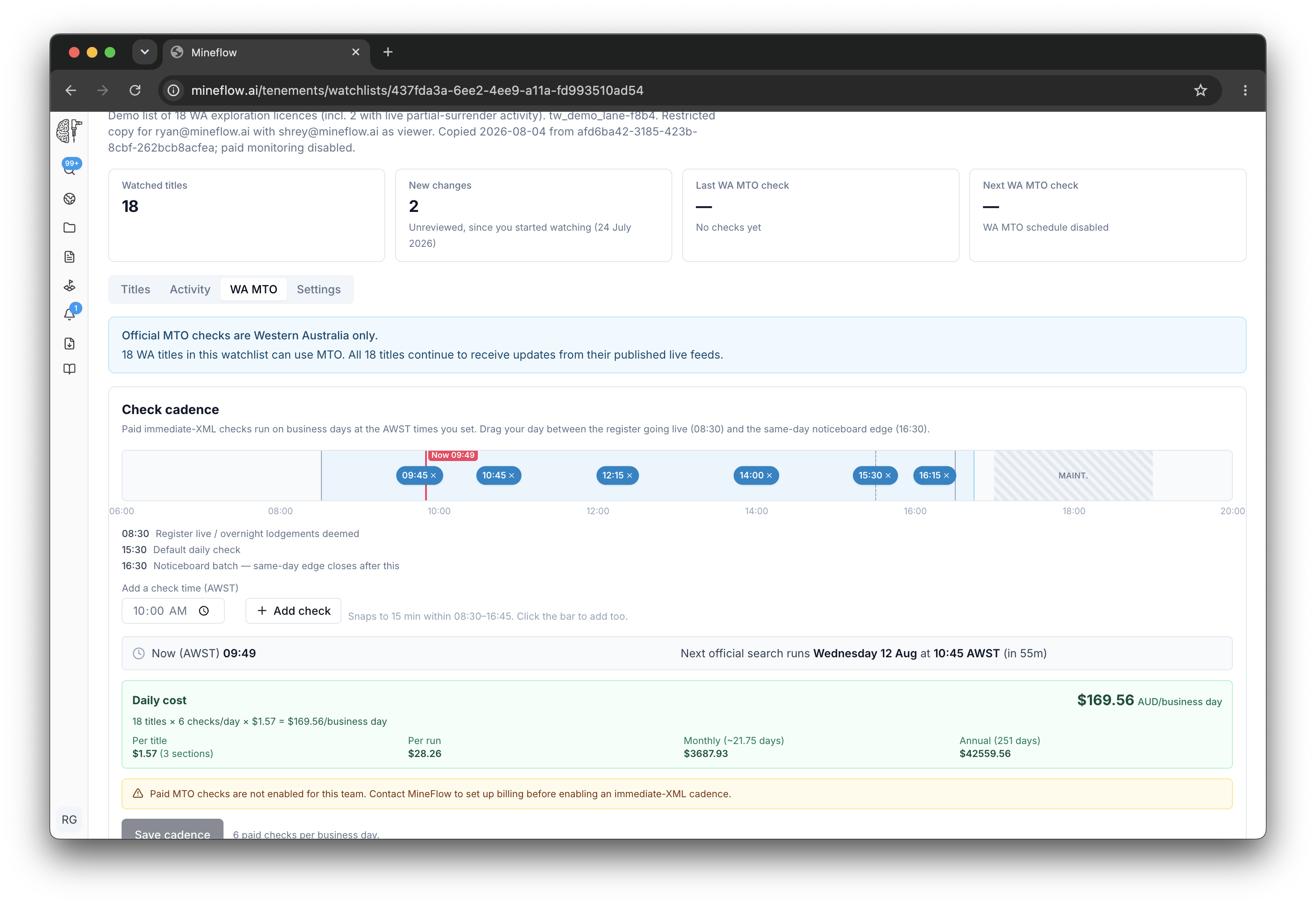
To stop future scheduled orders, remove the saved check times and select Save cadence. This does not cancel a check that has already started or stop published live-feed monitoring.
Run a one-off paid check
An owner or editor can select Run check now. Review the eligible title count, number of orders, and estimated cost in the confirmation dialog before confirming.
A one-off check uses the watchlist's configured search sections. It is separate from the recurring schedule and does not change the saved check times.
Read the result and cost
| Status | What to do |
|---|---|
| Queued / Ordering | The request is preparing or placing its official-search order. Follow this run in the history. |
| Ordered / Awaiting delivery / Parsing | The order is progressing through delivery and processing. Allow it to finish. |
| Completed | Review the resolved titles, changes, cost, and result details. No changes is a valid outcome. |
| Failed / Suspended | Read the explanation and contact support if action is needed. |
| Payment unknown | Contact Mineflow with the existing run reference before requesting another paid check. |
The billed owner receives a summary for a completed paid check, including checks that find no changes. Observed title changes also appear in Watchlist activity.