Export predictions
Include a completed prediction in a standard 3D export package, and understand which downstream formats are currently available.
Check format availability first
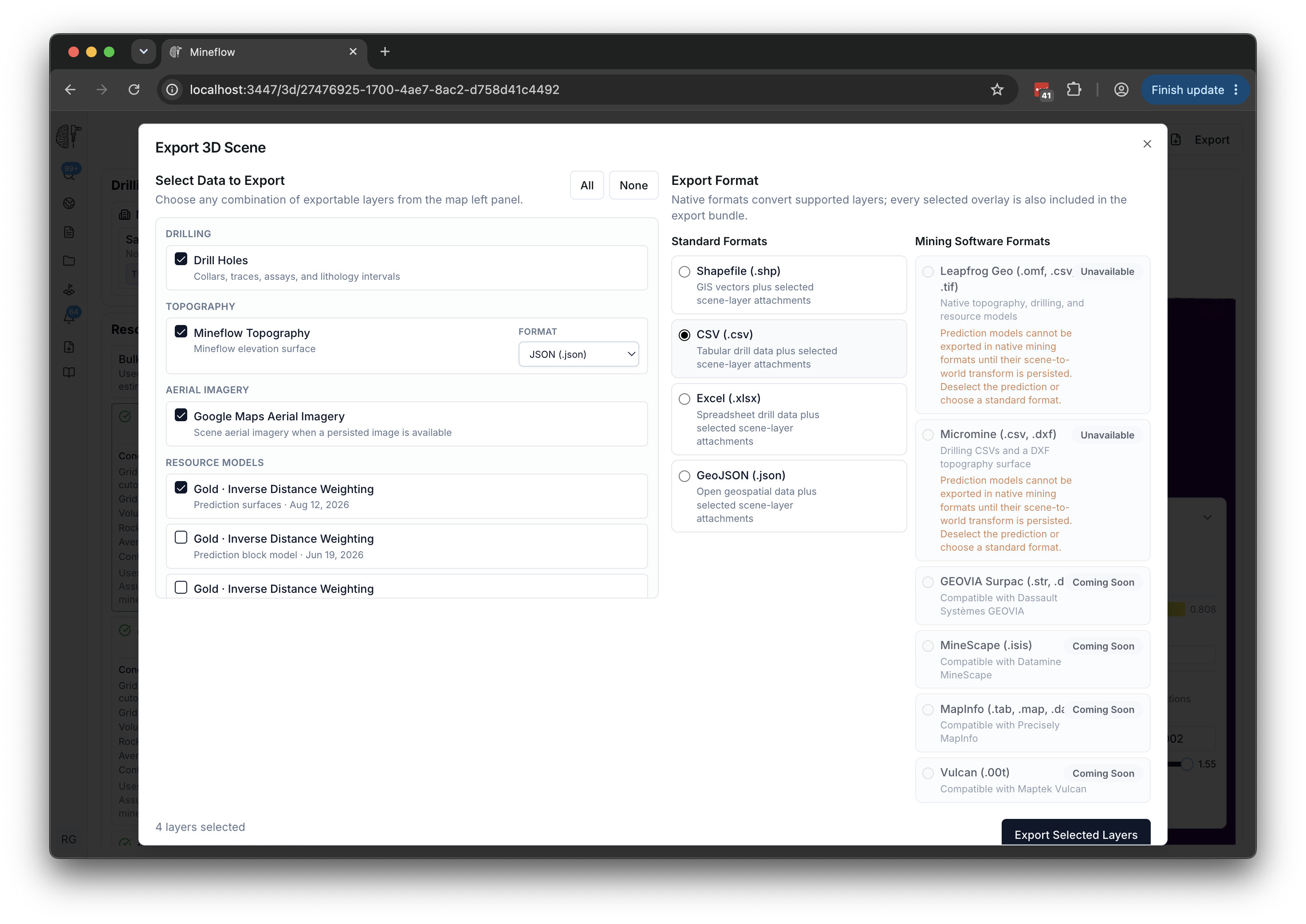
Prediction layers cannot currently be exported in native Leapfrog or Micromine formats. Those choices are unavailable while a prediction is selected. Supported drilling and terrain can still be exported to those applications after deselecting predictions.
Standard 3D formats such as CSV, Excel, Shapefile, and GeoJSON can include selected prediction output as attachments. The chosen package format does not mean every attached surface or block model has been converted into that format.
Select the completed run you need
- Open the relevant 3D scene and its Past Predictions.
- Load the completed run. Check the target, method, date, and output type.
- Open Export and select the intended prediction under Resource Models.
- Choose an available standard format, review the other included layers, and start the export.
- Download the completed package from Exports.
Inspect the output before using it elsewhere
Keep the package's metadata, source references, and prediction settings with the output. Confirm the coordinate information and geometry expected by the receiving tool before combining it with other data.